If a card has a $1,000 limit and a $250 balance, its utilization is 25 percent: 250 divided by 1,000. Overall utilization uses the sum of balances divided by the sum of limits. The CFPB recommends keeping balances low relative to limits.
Per-card and overall ratios
Both views are useful. One nearly maxed-out card can be worth attention even when your total ratio looks lower. Credit reports may show the balance an issuer reported at a particular time, which can differ from what you see after a payment.
Use the calculator
 Inside Credit Building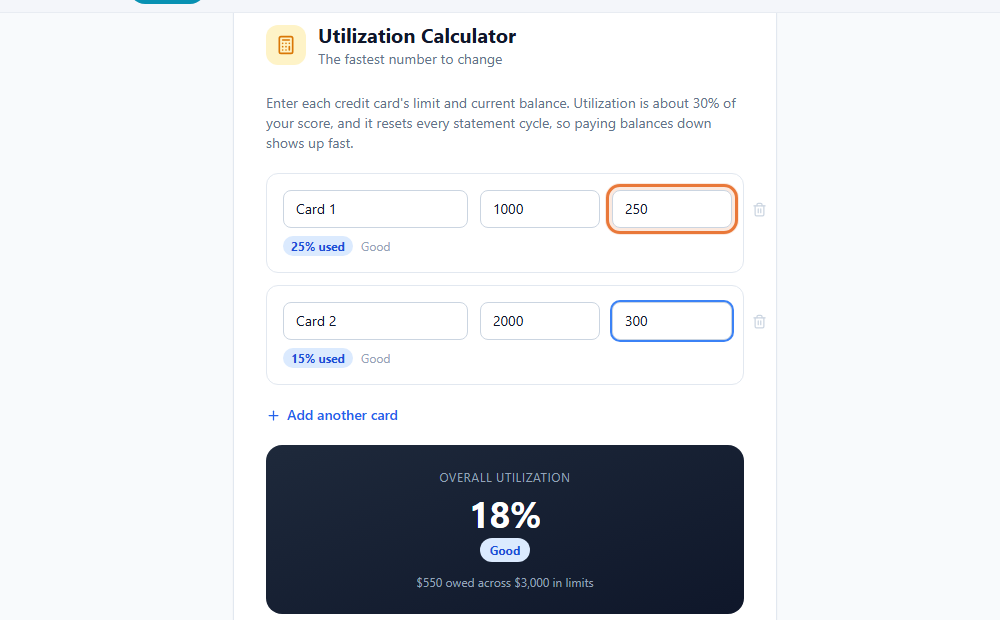
- Open the Utilization Calculator. Start with the two card rows already shown, or add another row.
- Enter each card's limit and balance. Use the values you want to model. The tool calculates utilization for that card.
- Review the overall result. The tool adds the entered balances and limits, then divides them to show one combined ratio.
- Model a payment. Lower a balance to see how the ratios change. Treat the result as a calculation, not a promised score increase.
- Check statement timing. If you want a lower balance to be reported sooner, ask your issuer when it reports and review the next statement.
Do not pay interest for a score
The CFPB says paying card balances in full can be good for scores and helps avoid interest. A lower reported balance may help, but paying more than you can afford is not a strategy. Use the calculator to plan within your budget.
This guide is general education, not legal or financial advice. CreditPath and ToolsToHelp.Me do not promise any change to your credit report or score. For advice about your situation, talk to a qualified professional, such as a nonprofit credit counselor or an attorney.